Introduction
Instagram stories are designed to be temporary. That 24-hour countdown is built into the platform's DNA it creates urgency, encourages daily posting, and keeps feeds feeling fresh and current. But for many people, that disappearing act is a genuine problem.
A competitor posts a limited-time promotion in their story. A public figure makes a statement that you need to document. A brand runs a creative campaign you want to reference later. A journalist captures breaking news in a story that will vanish by morning. An influencer shares content you want to analyze for your own creative research.
In all of these situations and dozens of others the ability to download an Instagram story before it disappears is not just convenient, it is genuinely necessary.
The good news is that downloading public Instagram stories is straightforward, completely free, and requires no app installation, no Instagram account, and no technical expertise. In this guide we will walk through the complete process of downloading Instagram stories using InstaPV, explain what you can and cannot download, and answer every common question about story downloading in 2025.
Why You Might Need to Download Instagram Stories
Before getting into the how-to, it helps to understand the full range of legitimate reasons people download Instagram stories. This is not just a niche use case it applies to a wide range of professional and personal situations.
Competitor research and market intelligence. If you are monitoring competitor accounts as part of a marketing strategy, downloading their stories lets you build a reference archive of their campaigns, promotions, and messaging over time. Stories disappear in 24 hours, but your archive does not.
Influencer content review. Before partnering with an influencer, brands and agencies review their content style, production quality, and how they present sponsored material. Downloading sample stories lets you review content offline, share with team members, and make a more informed partnership decision.
Journalistic documentation. Journalists covering public figures, brands, or events often need to document story content as evidence or reference material. Screenshots capture a moment but do not preserve video. Downloading the story file preserves the full content with audio and motion.
Legal and compliance purposes. In cases involving public statements made in Instagram stories brand claims, public figures' statements, business communications having a downloaded copy of the original content is important for accurate documentation.
Creative research and inspiration. Content creators and designers often save story content from accounts they admire as a reference library for visual styles, animation techniques, and content formats they want to study or draw inspiration from.
Archiving your own content. If you want to save a copy of your own public stories without logging into Instagram, downloading through InstaPV lets you access and archive your content from any device.
All of these are legitimate, practical reasons to need a story download and none of them require you to do anything other than access content that is already publicly available.
What You Can and Cannot Download
Before getting into the step-by-step process, it is important to be clear about what is downloadable through InstaPV and what is not.
What You Can Download
Active stories from public accounts. Any story currently live on a public Instagram account within its 24-hour window can be downloaded through InstaPV. This includes photo stories, video stories, boomerangs, and stories with text overlays, stickers, and interactive elements.
Instagram Highlights from public accounts. Highlights are archived stories that remain permanently on a profile. All story content saved within a public account's Highlights can be downloaded through InstaPV just as easily as active stories.
Profile pictures in full resolution. InstaPV also lets you download profile pictures from public accounts in their original full resolution useful for research, documentation, or reference purposes.
What You Cannot Download
Stories from private accounts. InstaPV only accesses publicly available content. Stories from private accounts are not accessible through any legitimate tool, and any tool claiming otherwise should be avoided.
Direct messages or other non-public content. InstaPV does not access private Instagram data of any kind only publicly visible profile content.
Content from accounts that have been deleted or deactivated. Once an account is deleted, its content is no longer publicly accessible.
Step-by-Step Guide: How to Download Instagram Stories Using InstaPV
Here is the complete process for downloading Instagram stories through InstaPV, from start to finish.
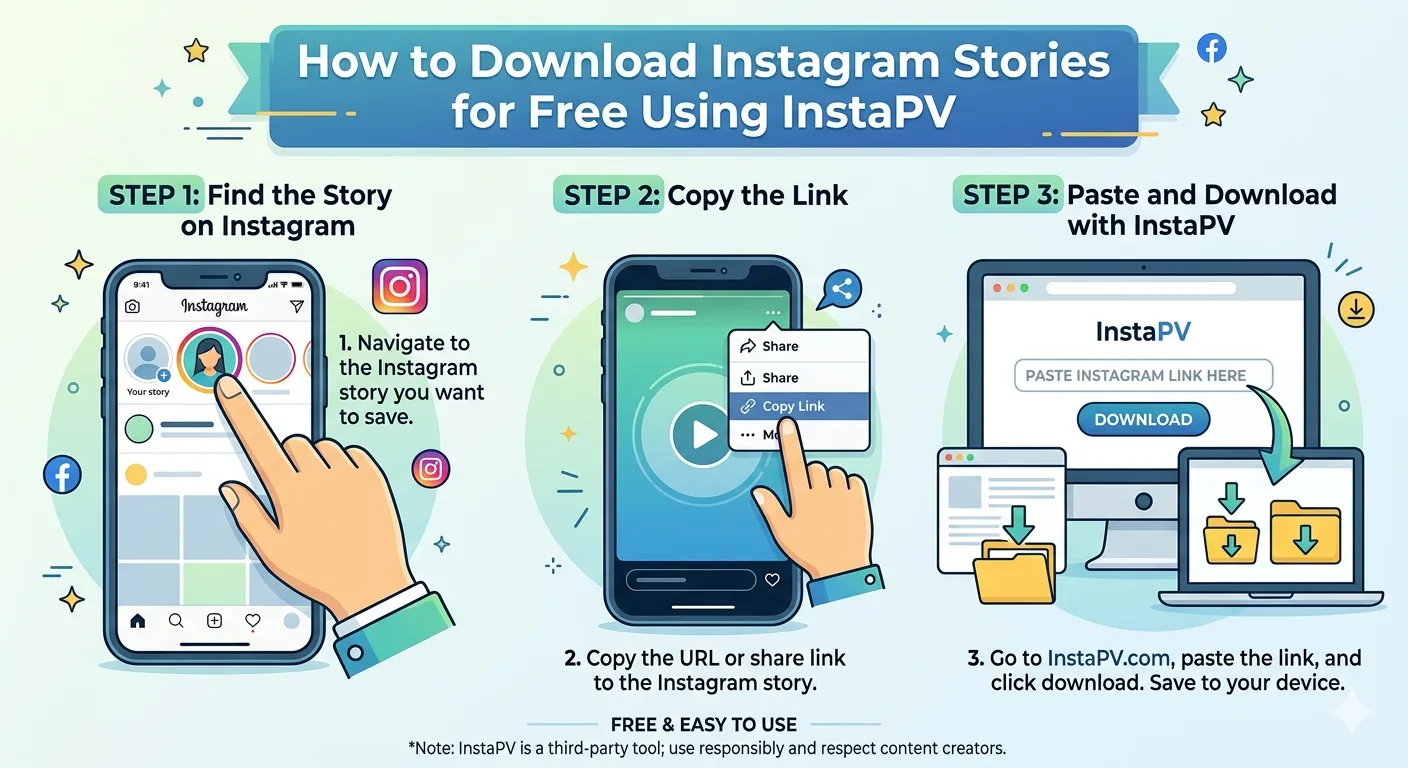
Step 1: Open InstaPV in Your Browser
Navigate to instapv.xyz in any web browser Chrome, Safari, Firefox, Edge, or any other browser on desktop or mobile. No app installation is required. No account creation or login is needed at any stage.
InstaPV works on all devices and operating systems. Whether you are on a Windows PC, Mac, iPhone, Android phone, or tablet, the process is identical.
Step 2: Enter the Instagram Username
In the search bar on the InstaPV homepage, type the username of the public Instagram account whose stories you want to download. You do not need to include the @ symbol — just the username itself.
-
Instagram Profile Viewer InstaPV
-
What Are Instagram Highlights? How to View Them Anonymously
-
5 Best Free Instagram Story Viewer Tools Compared (2026)
Double-check the spelling before searching. Instagram usernames are case-insensitive but exact spelling matters.
Step 3: Load the Profile
Press Enter or tap the Search button. InstaPV will retrieve the account's publicly available profile information and display it within a few seconds. You will see the account's profile picture, bio, follower and following counts, post count, and any active stories or Highlights.
If the account is private, InstaPV will indicate that the profile is not publicly accessible and no story content will be available to download.
Step 4: Select the Story or Highlight You Want
If the account has active stories, they will appear in the story viewer section of the profile. Tap or click on the story you want to download to open it in fullscreen view.
If you want to download content from a Highlight, scroll down to the Highlights section of the profile, select the Highlight collection you want, and navigate to the specific story frame within it.
Step 5: Download the Story
Once the story is open in fullscreen view, you will see a download button — typically represented by a downward arrow icon. Click or tap this button to save the story directly to your device.
For photo stories, the file will be saved as a JPEG or PNG image file. For video stories, it will be saved as an MP4 video file. The download happens directly to your device's default download folder or camera roll, depending on your device and browser settings.
Step 6: Repeat for Additional Stories
If you want to download multiple stories from the same account, navigate through the story sequence using the forward and back controls in the fullscreen viewer and download each one individually. For Highlights with multiple frames, you can download each frame separately.
There is no limit on how many stories you can view in a session on InstaPV's free tier, though very high-volume downloading for commercial redistribution purposes is outside the intended use of the tool.
How to Download Instagram Stories on Mobile
The process on mobile is identical to desktop, with one small difference in how the downloaded file is handled depending on your device.
On iPhone and iPad
When you tap the download button on InstaPV in Safari or Chrome on iOS, the file will typically open in a preview. To save it to your Camera Roll, tap the Share button and select "Save to Photos." Alternatively, tap and hold on a photo story to get the save option directly.
For video stories on iOS, the file will download to your Files app. From there you can move it to your Photos library by opening the file and selecting "Save Video."
On Android
On Android devices, downloaded files go directly to your device's Downloads folder by default. Photo stories are saved as image files and video stories as MP4 files. You can find them in your Files app or Gallery app depending on your Android version and manufacturer.
To move a downloaded story to your Gallery for easier access, open your Files app, find the downloaded file, and use the Move or Copy option to place it in your Pictures or Movies folder.
Downloading Instagram Highlights: A Special Case
Instagram Highlights deserve a separate mention because they work slightly differently from active stories and offer some unique research opportunities.
Unlike active stories that are only available during their 24-hour window, Highlights are permanently available on the profile. This means you can download Highlight content at any time days, weeks, or even years after the original story was first posted.
This makes Highlights particularly valuable for archiving and research. If a brand ran a product launch campaign six months ago and saved the story content in a Highlight, that entire campaign is still accessible and downloadable through InstaPV today.
To download from a Highlight through InstaPV, navigate to the Highlights section of the profile view, select the relevant Highlight collection, and use the download button on any individual frame within it. The process is identical to downloading an active story.
What to Do With Downloaded Instagram Stories
Once you have downloaded story content, here are the most common and legitimate ways people use it.
Build a Competitor Research Archive
Create a dedicated folder on your computer or cloud storage for each competitor account you monitor. Download their stories and Highlights regularly and organize them by date and campaign type. Over time this builds an invaluable archive of competitor content strategy that you can reference when planning your own campaigns.
Create a Visual Inspiration Library
Content creators and designers benefit enormously from having a personal reference library of story content they admire. Download stories that feature visual styles, animation techniques, typography choices, or content formats you want to study. Organize by category color palettes, motion graphics, text styles, product showcases for easy reference.
Document Public Statements
For journalists and researchers, downloaded stories provide verifiable documentation of public statements made on Instagram. Always include metadata in your records the account username, the date you downloaded the content, and any relevant context about when the story was originally posted.
Share With Your Team
If you are doing research that involves multiple team members a marketing team reviewing influencer options, a legal team documenting public communications, an agency preparing a competitive analysis downloaded stories are easy to share via email, Slack, or any file sharing platform without requiring everyone to have an Instagram account or access to InstaPV.
Analyze Content Format Performance
For social media managers studying what content formats drive the most engagement, having downloaded examples of high-performing stories from successful accounts in your niche is a concrete reference for your own content planning.
Important Ethical and Legal Considerations
Downloading public Instagram stories is legal when done for personal research, documentation, journalism, and reference purposes. However, there are important ethical boundaries to respect.
Do not redistribute downloaded content as your own. Downloading a story for personal research is fundamentally different from reposting that content under your own name or using it commercially without permission. The latter raises serious copyright concerns regardless of whether the original content was publicly accessible.
Do not use downloaded content to harass or harm. Downloading and then sharing, manipulating, or weaponizing someone's story content for the purpose of harassment or reputational damage is both unethical and potentially illegal regardless of the original content's public accessibility.
Respect the context of the content. Public does not mean free for any use. A business's promotional story content downloaded for competitive research is different from sharing that same content in a way that misrepresents the brand or uses it out of context.
Credit the original creator when appropriate. If you are using a downloaded story as a reference example in a blog post, presentation, or publication, crediting the original account is both respectful and good practice.
InstaPV is designed as a tool for legitimate research, documentation, and anonymous browsing of publicly available content. Using it responsibly means staying within these ethical boundaries.
Frequently Asked Questions
Q: Is downloading Instagram stories legal? Downloading publicly available Instagram story content for personal research, reference, journalism, and documentation purposes is legal in most jurisdictions. Redistributing downloaded content commercially or using it in ways that violate the creator's copyright is a separate matter and may raise legal issues depending on the use case and jurisdiction. When in doubt about a specific use case, consult a legal professional.
Q: Will the account owner know I downloaded their story? No. Downloading through InstaPV involves no interaction with the account owner's Instagram metrics. They will not receive a notification and will not see any record of your download.
Q: Can I download stories in HD quality? InstaPV downloads stories in the quality they are publicly available which is typically the resolution at which they were originally uploaded. Most Instagram stories are uploaded at 1080 x 1920 pixels, and downloads through InstaPV reflect that original quality.
Q: Does InstaPV store downloaded stories on its servers? InstaPV retrieves content for your viewing and downloading session but does not permanently store downloaded files on its servers. Your downloaded files go directly to your device.
Q: Can I download Instagram Reels through InstaPV? InstaPV's primary focus is on stories and Highlights. For Reels downloading capabilities, check the current feature set at instapv.xyz as the platform continues to expand its functionality.
Q: How many stories can I download at once? Through InstaPV's free tier, you can download stories individually. InstaPV Pro offers expanded capabilities for users with higher-volume research needs. Check instapv.xyz for the current Pro feature details.
Q: Does this work for downloading stories on iPhone without an app? Yes. InstaPV is fully web-based and works in Safari on iPhone without any app installation. After downloading, follow the iOS steps described earlier in this guide to move the file to your Photos library.
Conclusion
Downloading Instagram stories does not have to be complicated, expensive, or risky. With InstaPV, the entire process takes under a minute search the username, open the story, tap download, done. No app, no login, no Instagram account required.
Whether you are building a competitor research archive, documenting public content for journalistic purposes, saving creative inspiration for your design library, or simply preserving a piece of public content before it disappears, InstaPV gives you a free, clean, and reliable way to do it.
The 24-hour story window no longer has to be a limitation. Every piece of public story content you need is accessible and downloadable, on your schedule, on any device.