Introduction
Most of what InstaPV does through its web interface, viewing public Instagram profiles, accessing story and Highlight content, tracking follower growth trends, and calculating engagement rates, can also be accessed programmatically through InstaPV's API. For developers building applications, businesses integrating Instagram data into their workflows, and technical teams creating custom analytics tools, the API opens up capabilities that go well beyond what the web interface alone provides.
This guide covers what the InstaPV API offers, the use cases it supports, how to get started with integration, and practical considerations for developers and technical teams building on top of it.
What the InstaPV API Does
The InstaPV API provides programmatic access to publicly available Instagram data for any public account, using the same data sources and analytics calculations that power the InstaPV web interface. The key distinction is that API access allows this data to be retrieved, processed, and integrated into external applications without requiring a human to manually navigate the web interface.
For developers, this means being able to build Instagram data capabilities directly into applications, internal tools, client dashboards, and automated workflows rather than requiring users to visit InstaPV separately for every data lookup.
The core data available through the API mirrors what the web interface provides: public profile information including follower counts, following counts, bio, and post counts, follower growth historical data, engagement rate calculations, posting frequency analytics, Story and Highlight content from public accounts, and profile picture retrieval.Read blog
Who the API Is For
The InstaPV API is relevant to several distinct user categories who have programmatic data needs rather than manual research needs.
Developers Building Instagram Analytics Tools
Developers building dedicated Instagram analytics platforms, social media management tools, or influencer marketing applications can use the InstaPV API to power their Instagram data layer rather than building their own data collection infrastructure from scratch. Using InstaPV as a data backend allows focusing development effort on the application layer while the API handles the complexities of data collection and processing.
Businesses With Custom Reporting Workflows
Business intelligence teams that produce regular reports on Instagram performance across multiple accounts, markets, or competitor sets can automate data collection through the API rather than relying on manual research processes. Scheduled API calls can populate custom dashboards, trigger alerts when specific metrics cross defined thresholds, and feed data into existing BI infrastructure alongside data from other sources.
Agencies Managing Multiple Client Accounts
Marketing agencies tracking Instagram performance for large numbers of client accounts can build internal tools that consolidate competitor research, influencer evaluation, and client benchmarking into automated workflows rather than requiring analysts to manually check each account through the web interface.
Researchers and Data Scientists
Academic researchers, market research firms, and data scientists studying Instagram behavior, content trends, or influencer marketing effectiveness can use the API to build datasets across large numbers of public accounts efficiently.
Core API Endpoints
While the specific implementation details of the InstaPV API are documented in the current API documentation available at instapv.xyz, the core functionality areas cover the primary use cases developers are likely to need.
Profile Data Endpoint
Retrieves public profile information for any specified public Instagram username. Returns the display name, bio, follower count, following count, post count, profile picture URL, category label for business accounts, and website link. This endpoint is the foundation for any application feature that needs to display or process basic Instagram profile information.
Follower Growth Endpoint
Returns historical follower count data for a specified public account across available historical periods. The returned data enables applications to display growth trend charts, calculate growth rates over specified periods, and generate growth-based alerts or reports without the application needing to implement its own time-series data collection and storage.
Engagement Analytics Endpoint
Returns engagement rate data for a specified public account, including current engagement rate and historical trend data. Applications can use this data to build engagement benchmarking features, influencer evaluation scoring, and engagement rate comparison tools.
Story and Content Endpoint
Provides access to publicly available Story content and Highlight collections for specified public accounts. For applications that need to display current Story content, archive Story content, or surface Highlight information, this endpoint provides the data layer for these features.
Getting Started With the InstaPV API
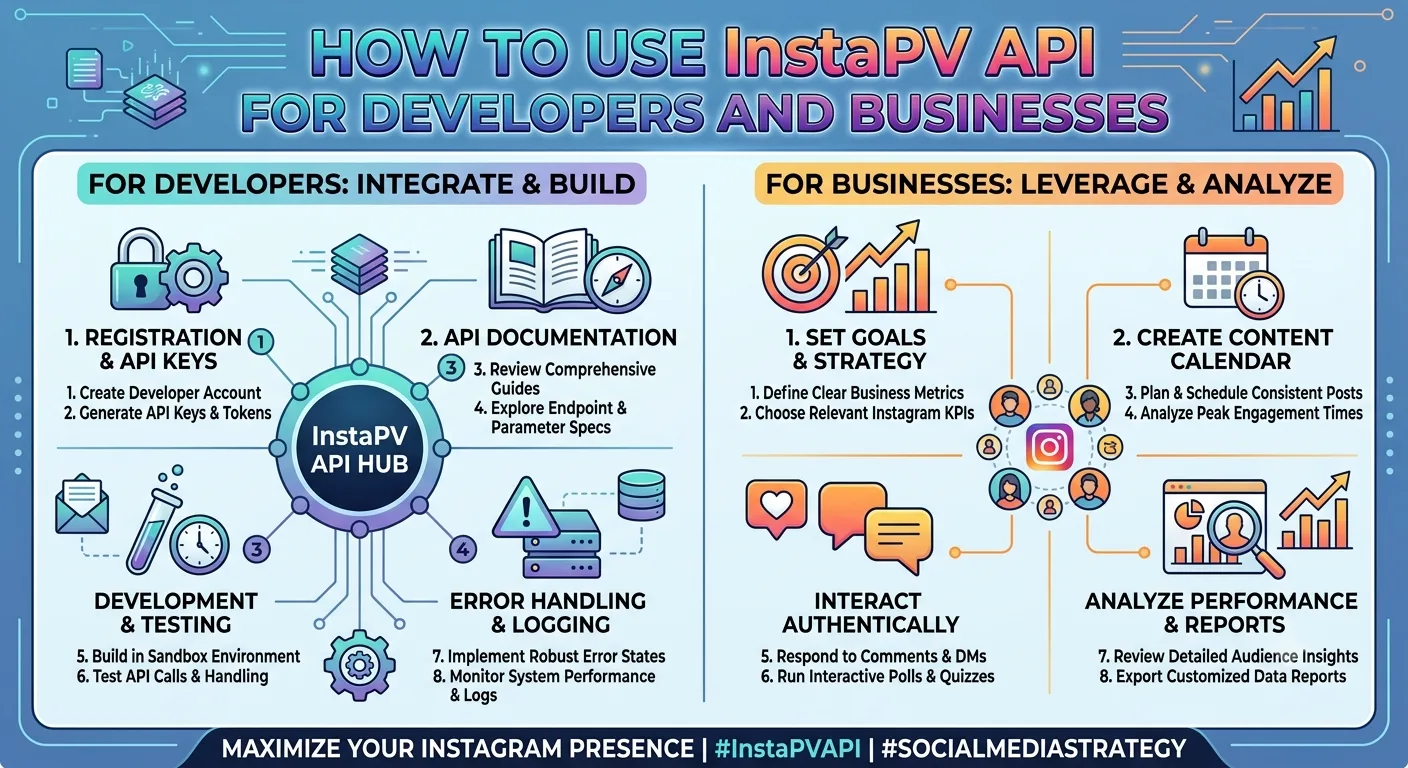
For developers ready to integrate the InstaPV API, the practical starting steps follow a standard pattern for REST API integration.
Step 1: Obtain API Access
API access is available through InstaPV Pro. Visit instapv.xyz to review current API access options, rate limits, and pricing for the level of API usage your application requires. Different usage tiers accommodate different request volumes, from light testing through production scale applications.
Step 2: Review the API Documentation
The full API documentation, available through InstaPV's developer resources, covers endpoint specifications, request format, authentication requirements, response structure, error codes, and rate limiting details. Reviewing the documentation thoroughly before beginning development prevents integration issues that arise from undocumented assumptions about how the API behaves.
Step 3: Authenticate Your Requests
InstaPV's API uses standard API key authentication. Include your API key in the header of each request as specified in the documentation. Keep API keys secure and never expose them in client-side code or public repositories.
Step 4: Make a Test Request
Before building your integration, make a simple test request to a single endpoint using your preferred HTTP client or a tool like Postman. Confirming that authentication works and that the response structure matches what the documentation describes is a worthwhile step before investing development time in the full integration.
A basic example of an API request structure in JavaScript would look something like this.
const response = await fetch('https://api.instapv.xyz/v1/profile?username=targetaccount', {
  headers: {
    'Authorization': 'Bearer YOUR_API_KEY',
    'Content-Type': 'application/json'
  }
});

const data = await response.json();
console.log(data);
Step 5: Handle Responses and Errors
Instagram data requests can fail for various reasons including private accounts, deleted accounts, rate limit exhaustion, or temporary service issues. Building robust error handling that gracefully manages each failure mode, rather than assuming every request will succeed, is essential for production quality integrations.
Practical Integration Examples
Building a Competitor Monitoring Dashboard
An agency building an internal competitor monitoring dashboard can use the follower growth and engagement analytics endpoints to populate a custom interface that displays multiple competitor accounts simultaneously with trend visualization rather than requiring analysts to check each account individually through the web interface.
A scheduled daily job calls the follower growth endpoint for each tracked competitor, stores the returned data in the agency's own database, and powers dashboard charts that show comparative growth trends across the full competitor set over time. Analysts open one internal dashboard rather than checking multiple accounts individually through external tools.
Automated Influencer Scoring in an Influencer CRM
An influencer marketing platform can integrate the engagement analytics endpoint to automatically calculate and update engagement scores for influencer profiles stored in their CRM. Rather than requiring users to manually check each influencer's current engagement rate, the integration runs periodic API calls that refresh engagement scores automatically and trigger alerts when scores change significantly.
Client Reporting Automation
An agency automating client reporting can use the API to pull current and historical metrics for each client's tracked competitor set, combine this with the client's own analytics data from other sources, and automatically generate the competitive benchmarking section of monthly reports without requiring an analyst to gather this data manually.
Influencer Discovery Application
A developer building an influencer discovery tool can use the profile data and engagement analytics endpoints to power search and filtering functionality that allows users to find public Instagram accounts meeting specific follower count, engagement rate, and growth criteria. The API provides the underlying data that the application's search and ranking logic operates on.
Rate Limiting and Best Practices
API rate limits exist to ensure reliable service across all users and to prevent individual integrations from consuming disproportionate resource capacity. Building integrations that respect rate limits rather than hitting them requires several practical approaches.
Cache responses that do not need to be real-time. Profile information and historical growth data that is unlikely to change within a few hours does not need to be retrieved on every application request. Caching responses reduces the number of API calls required while maintaining data freshness appropriate to the data type.
Use batch processing for bulk data needs. If your application needs to retrieve data for many accounts, processing them in batches with appropriate delays between requests rather than sending all requests simultaneously both respects rate limits and produces more predictable application behavior.
Implement exponential backoff for rate limit errors. When a rate limit error is returned, waiting with progressively longer delays before retrying is more effective than immediate retry loops that continue hitting the rate limit.
Review the current rate limit documentation at instapv.xyz for specific limit values and any available options for higher limits through upgraded API access tiers.
Data Freshness and Historical Availability
Understanding the freshness and historical depth of data returned by the API is important for building applications with appropriate user expectations and accurate representations of what the data reflects.
Current profile data including follower counts is refreshed on a regular schedule and reflects recent rather than real-time values. For most application purposes, data that is updated regularly is sufficient, though applications representing data as real-time should account for the refresh interval in how they present the information.
Historical follower growth data is available from the point at which InstaPV began tracking each account. For accounts that have been frequently searched through InstaPV, historical data may extend back considerably. For accounts searched for the first time, tracking begins from that initial search with historical depth accumulating over time.
Privacy and Compliance Considerations
The InstaPV API accesses publicly available Instagram data only, consistent with the public account focus throughout this series. Applications built on the API inherit this public data only characteristic and should be designed accordingly.
Applications should not represent API-sourced data as real-time when it reflects periodic updates, should accurately represent that the data covers public accounts only, and should comply with applicable data protection regulations relevant to their jurisdiction and use case when storing or processing retrieved data.
Building privacy considerations into application design from the beginning is significantly easier than retrofitting them after the fact, and aligning application design with the public data only principle of the underlying API keeps applications within the appropriate use boundaries.
Frequently Asked Questions
Q: Can the InstaPV API access data for private Instagram accounts?
No. Consistent with everything covered throughout this series, the InstaPV API accesses only publicly available data from public Instagram accounts. Private account data is not available through the API regardless of how requests are structured.
Q: What programming languages can I use to integrate the InstaPV API?
The API uses standard REST conventions with JSON responses, making it compatible with any programming language that supports HTTP requests. Common integration languages include JavaScript and Node.js, Python, PHP, Ruby, and Go among many others.
Q: How do I handle accounts that switch from public to private after my application has been tracking them?
When an account switches to private, subsequent API requests for that account's content will return appropriate error responses indicating the account is not publicly accessible. Build error handling that gracefully manages this transition, updates the account's status in your application's data, and stops making further content requests for that account until it becomes public again.
Q: Is there a sandbox or testing environment for development?
Check the current API documentation at instapv.xyz for available testing options and any sandbox environments provided for development and testing purposes before making production API calls.
Q: How do I stay updated on API changes and new endpoints?
Checking InstaPV's developer documentation and any available changelog resources at instapv.xyz provides the most current information on API updates, new endpoints, deprecated functionality, and version changes that may affect existing integrations.
-
Instagram Metrics That Actually Matter for Business Growth.
-
How to Spot Fake Instagram Followers Using Analytics
-
Instagram for Non-Profits: Grow Your Cause with Analytics
Conclusion
The InstaPV API extends the platform's public Instagram data capabilities into programmatic workflows, enabling developers and technical teams to build Instagram data features into applications, automate data collection for reporting and analytics, and create custom tooling that serves specific business needs more precisely than any general-purpose web interface can.
For developers building Instagram-powered features, agencies automating research and reporting workflows, and data teams building analytical infrastructure around public Instagram data, the API provides a reliable, well-documented foundation that handles the complexities of public data access so development effort can focus on the application layer rather than the data collection layer.
Learn more about InstaPV API access and documentation at instapv.xyz →