Introduction
Instagram Highlight covers are the small circular images that appear on a profile page beneath the bio, representing each saved Highlight collection. They are often the first visual element a new profile visitor notices after the profile picture, and for accounts that have invested in custom cover design, they communicate brand identity and content organization before a single piece of content is opened.
For researchers and marketers studying competitor profiles, Highlight covers reveal content organization and branding approaches worth understanding. For creators wanting to improve their own profile presentation, studying how successful accounts design their covers provides direct creative reference. For anyone wanting to understand a specific account's content categories at a glance, the covers and their labels provide an immediate structural overview.
This guide covers everything about Highlight covers: what they are, how to view them on any public account, how to download them for reference or research, and how to create effective covers for your own account.
What Instagram Highlight Covers Are
A Highlight cover is the circular image that represents a Highlight collection on a profile page. Each cover is accompanied by a label of up to 15 characters that names the collection.
When a Highlight is first created, Instagram defaults to using the most recent Story added to that collection as the cover image. Most accounts investing in their profile presentation replace this default with a custom designed cover image that fits a consistent visual theme across all their Highlights.InstaPV
Custom Highlight covers are created from any image in the account owner's camera roll and uploaded through the Highlight editing interface. Many creators use specifically designed icon sets with consistent backgrounds to create a unified, professional looking row of Highlights beneath their bio.
Why Highlight Covers Matter for Profile Presentation
Highlight covers function as a navigation system for profile visitors. When someone new arrives at a profile, the Highlight covers and their labels give an immediate overview of what content the account has organized and preserved.
A well designed row of Highlight covers communicates several things simultaneously. The labels tell visitors what categories of content the account covers. The visual design of the covers communicates brand identity and production investment. The number of Highlights suggests how much organized content exists beyond the current feed.
For business accounts and professional creators, this navigation function is directly tied to conversion. A new visitor who can quickly identify that the account has a FAQ Highlight, a testimonials Highlight, and a products Highlight has a much clearer picture of the account's value than one who sees only a grid of posts with no organized supplementary content.
How to View Highlight Covers on Any Public Account
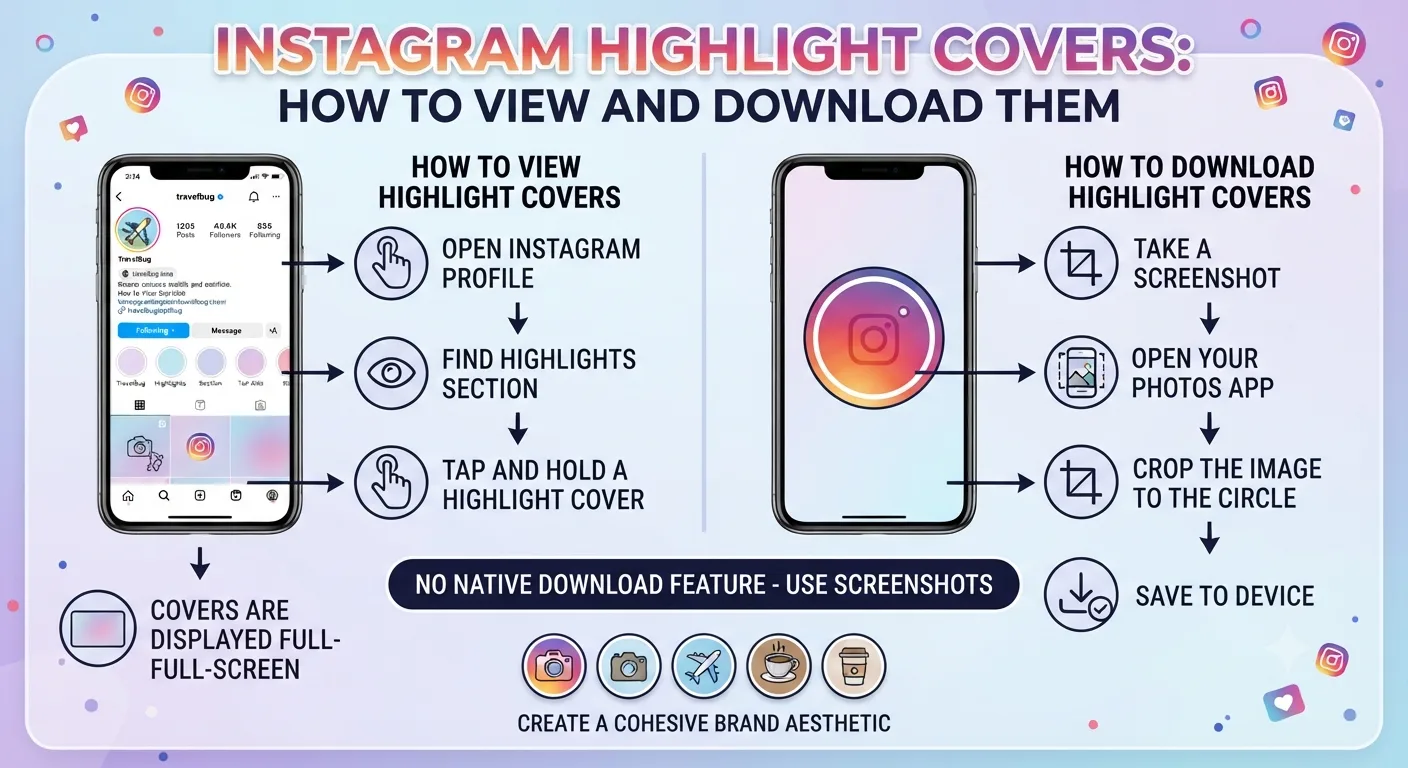
Viewing Highlight covers on a public account requires only visiting the profile. The covers are displayed publicly on any public Instagram profile below the bio section.
However, viewing them through Instagram's own interface while logged in creates the viewer records discussed in Day 13's guide to what happens when you view Stories. Viewing the profile and opening Highlights through InstaPV provides the same visual access to covers and their associated content without any viewer record being created.
Using InstaPV to View Highlight Covers
Go to instapv.xyz and search the username of the public account whose Highlights you want to view. Once the profile loads, the Highlights section displays all available collections with their covers and labels visible.
Tapping or clicking on any Highlight cover opens the full Highlight content in InstaPV's viewer, allowing you to review not just the cover image but all the Story content organized within that collection.
This anonymous viewing is particularly useful for competitive research, where you want to study how a competitor has organized and presented their permanent content without appearing in their viewer analytics.
How to Download Highlight Covers for Reference
Downloading Highlight cover images for reference or research purposes follows the same process as downloading any Story content through InstaPV, as covered in Day 3's story downloading guide.
Step by Step Process
Open instapv.xyz and search the username of the account whose Highlight covers you want to download. When the profile loads with its Highlights section visible, select the Highlight whose cover you want to save. Within the Highlight viewer, the cover image or the first frame of the Highlight content is accessible through the download option.
For the profile picture which may also be relevant to research alongside Highlight covers, InstaPV provides full resolution profile picture access as part of its profile viewer functionality.
Downloaded covers can be saved to your device's standard download folder or camera roll depending on the device and browser used, following the same process described in Day 3's guide.
What You Can Learn From Competitor Highlight Covers
For competitive research purposes, analyzing a competitor's Highlight covers and structure provides several useful insights beyond just visual reference.
Content Prioritization
The order in which Highlights appear on a profile, from left to right, typically reflects what the account considers most important for new visitors to see first. A business that places a testimonials Highlight first is prioritizing social proof. One that leads with a products Highlight is prioritizing direct commercial discovery. One that leads with a FAQ or About Highlight is prioritizing context and trust building before commercial content.
This ordering reveals something about the account's understanding of their visitor journey and what they consider the most important first impression beyond the bio.
Content Category Strategy
The labels on Highlight covers reveal how the account categorizes and thinks about its content. Comparing your own Highlight categories against a competitor's can reveal gaps where the competitor is organizing content you have not thought to preserve, or categories you have that the competitor lacks, potentially representing a differentiation opportunity.
Visual Branding Investment
The visual quality and consistency of Highlight covers signals the level of design investment the account has made in its profile presentation. Covers using custom designed icon sets with consistent color palettes and backgrounds represent a higher branding investment than default covers pulled directly from Story content.
Assessing the gap between your own Highlight cover quality and your strongest competitors' can inform whether investing in custom cover design is worth prioritizing.
Creating Your Own Effective Highlight Covers
Beyond researching other accounts' covers, creating strong covers for your own Highlights is a worthwhile profile investment.
Design Principles for Highlight Covers
Covers display at a small circular size on the profile page, which means detailed designs that look great at full size become unreadable at thumbnail size. Simple, high contrast icons or images with clear central subjects work better than detailed or text heavy designs at this scale.
Consistency across all covers is more important than the quality of any individual cover. A set of simple, identical background colored circles with distinct icons for each Highlight category creates a more professional impression than a mix of high and low quality covers in different styles.
Color Consistency With Profile Aesthetic
Highlight cover backgrounds should align with the overall color palette used across your profile content. Covers that clash with your feed's visual identity create a jarring impression for profile visitors rather than reinforcing brand consistency.
If your account uses a neutral, minimal aesthetic, covers with white or light neutral backgrounds and simple dark icons fit naturally. If your brand uses specific brand colors prominently, covers in those colors create direct visual consistency.
Icon Selection
The icon or image on each cover should communicate the Highlight category clearly at small size. Simple, widely recognized icons, a camera for photography content, a shopping bag for products, a speech bubble for testimonials, work better than abstract or complex imagery that requires interpretation.
Many creators use icon sets from design resources that provide consistent style across all icons, avoiding the visual inconsistency that comes from mixing icons from different sources.
Organizing Your Highlights for Maximum Profile Impact
Beyond the covers themselves, how you organize and label your Highlights affects how useful they are for profile visitors.
The most effective Highlight organization for most accounts puts the most universally relevant collections first. An About or Our Story Highlight helps every new visitor understand the account's context and identity. An FAQ or frequently asked content Highlight addresses common questions that would otherwise require direct outreach. A Best Of or Start Here Highlight curated from top performing past content gives new visitors immediate access to your strongest work.
Highlight labels should be short, clear, and specific. A 15 character limit requires brevity, but within that limit, specific labels like Products, Client Results, or Morning Tips communicate more than generic ones like Content or More or Videos.
-
Instagram Week 2 Recap: Trends, Updates, and What to Watch
-
How to Grow Instagram Followers Organically: 2026 Guide
-
The Ultimate Guide to Instagram for E-Commerce Brands
Frequently Asked Questions
Q: Can I view Highlight covers on a private account?
No. As covered throughout this series, private account content including Highlights and their covers is only accessible to approved followers. Highlight covers on private accounts are not visible to non-followers through any legitimate tool.
Q: How often should I update my Highlight covers?
Highlight covers do not need frequent updating once a consistent design system is established. The main reasons to update covers are rebranding, changing content focus that makes existing Highlight categories obsolete, or adding new Highlight categories as your content expands.
Q: Do custom Highlight covers affect account performance?
Custom covers do not directly affect algorithmic performance or engagement metrics. Their value is purely in profile presentation and the conversion improvement that comes from a more professional, organized profile impression for new visitors.
Q: Is there a limit to how many Highlights an account can have?
Instagram does not impose a publicly stated limit on the number of Highlights. Practically speaking, having too many Highlights can make the row crowded and harder to navigate for profile visitors. Most accounts find that five to eight well organized Highlights provides comprehensive coverage without overwhelming the profile presentation.
Q: Can I use InstaPV to research the Highlight structure of multiple competitor accounts efficiently?
Yes. Using InstaPV's saved profiles feature to maintain a list of competitor accounts makes it straightforward to regularly review their Highlight structure as part of a monthly competitive research session, without needing to re-search each account individually.
Conclusion
Instagram Highlight covers are a small but meaningful component of profile presentation that communicate brand identity, content organization, and production investment to every new profile visitor. Viewing and studying competitor covers through InstaPV provides research and creative reference that informs your own cover and Highlight strategy. Creating consistent, clear covers for your own account improves the navigability and professional impression of your profile for the new visitors whose follow decision your entire content strategy is designed to earn.
View Highlight covers and content for any public Instagram account on InstaPV →