Introduction
One of the most common questions people have about Instagram whether they are casual users, marketers, researchers, or journalists is a deceptively simple one: what can I actually see on someone's Instagram profile without following them?
The answer depends entirely on one setting: whether the account is public or private. That single toggle in Instagram's privacy settings determines an enormous amount about what information is accessible, to whom, and through what means.
But the reality is more nuanced than most people realize. Even on public accounts, not everything is visible. Even on private accounts, some information remains accessible. And the line between what is truly private and what is technically public but hard to find is blurrier than Instagram's interface suggests.
This guide gives you a complete, honest breakdown of exactly what data is visible on public versus private Instagram accounts, what tools like InstaPV can and cannot access, and what the practical implications are for researchers, marketers, journalists, and everyday users trying to understand the platform's privacy landscape.
The Fundamental Difference: Public vs Private
Every Instagram account is set to one of two visibility modes. Understanding what each one means is the foundation for everything else in this guide.
Public Accounts
A public Instagram account is visible to everyone whether or not they have an Instagram account, whether or not they follow the profile, and whether or not they are logged into Instagram. The content on a public account is, by definition, published to the open internet.
When someone sets their account to public, they are making a deliberate choice to share their content with the world without restrictions. This is the default setting for new Instagram accounts, which means the majority of Instagram accounts particularly business accounts, creator accounts, and brand profiles are public.
Public accounts are indexed by search engines, accessible through direct URL without any login, and retrievable by third-party tools that access publicly available web content.
Private Accounts
A private Instagram account restricts content visibility to approved followers only. When an account is set to private, a follow request must be sent and approved by the account owner before any content becomes visible.
Private accounts are not indexed by search engines in the same way public accounts are, and their content cannot be accessed by third-party tools. The privacy setting is enforced at the platform level Instagram actively restricts access to private account content for unauthenticated users and third-party services.
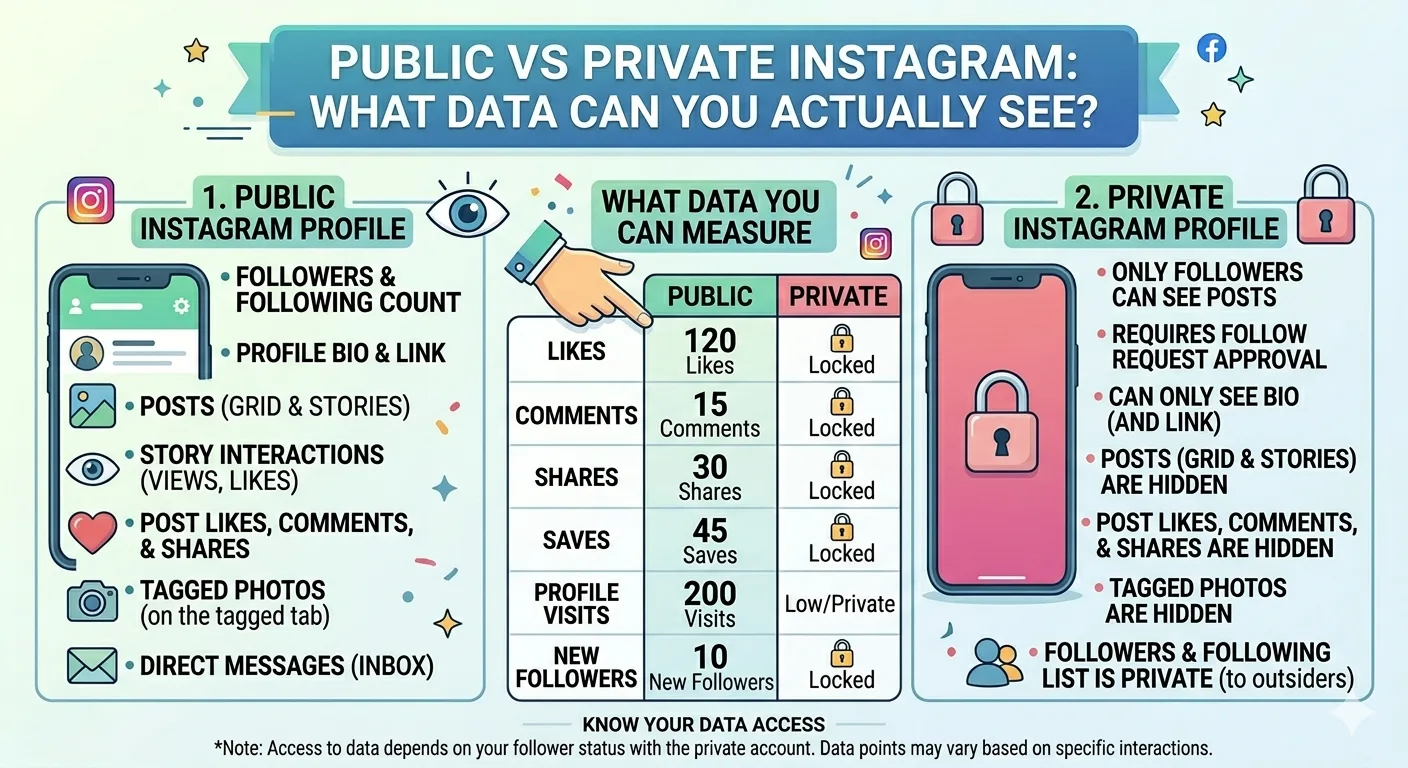
What You Can See on a Public Instagram Account
Public accounts are genuinely public but exactly what is visible varies depending on how you are accessing the content and what tools you are using. Here is a comprehensive breakdown.
Profile Information
The following profile information is publicly visible on any public Instagram account:
Display name. The name the account owner has chosen to display which may or may not be their real name.
Username. The unique @handle identifier for the account.
Profile picture. The circular profile image displayed on the profile page. Through InstaPV, this can be viewed and downloaded in full resolution.
Bio. The short text description in the profile section, up to 150 characters. This often includes professional information, location, links, and personal descriptions.
Website link. Any URL the account owner has added to their profile link field. Instagram allows one clickable link in the bio, though link-in-bio tools are commonly used to expand this to multiple destinations.
Follower count. The total number of accounts following the profile.
Following count. The total number of accounts the profile follows.
Post count. The total number of posts published to the profile grid.
Category label. Business and creator accounts can display a category label such as "Public Figure," "Restaurant," "Clothing Brand," or "Personal Blog" beneath their display name.
Contact buttons. Business accounts that have added contact information display Email, Call, or Directions buttons on their profile page.
Feed Posts
All posts published to the profile grid of a public account are publicly visible. This includes:
- Photo posts — single images and carousel posts with multiple images
- Video posts — standard video content published to the feed
- Reels — short-form video content in the Reels format
- Post captions — the full text caption accompanying each post
- Hashtags — all hashtags included in captions or comments
- Location tags — any geographic location tagged in the post
- Likes count — the total number of likes on each post (when visible — Instagram has experimented with hiding like counts in some regions)
- Comments — all public comments on the post and the usernames of commenters
- Tagged accounts — any Instagram accounts tagged in the post
Stories
Active stories those within their 24-hour visibility window on public accounts are publicly accessible. This is the content viewable through InstaPV's story viewer.
However, there is an important nuance: while the story content itself is publicly accessible, the viewer list the list of logged-in Instagram users who have watched the story is private and visible only to the account owner. This is why story viewer tools provide anonymity they access the publicly available story content without generating a viewer record.
Instagram Highlights
Highlights the curated collections of saved stories displayed below the bio are publicly visible on public accounts. All story content within a public account's Highlights can be viewed and accessed through InstaPV.
-
How to Find Trending Instagram Accounts in Your Niche
-
Understanding Instagram Engagement Rate: A Beginners Guide
-
How to Download Instagram Stories for Free Using InstaPV
Like active stories, the content of Highlights is publicly accessible while the viewer list for each Highlight frame remains private to the account owner.
Reels
Reels published to a public account's profile are publicly accessible, just like feed posts. Reels also have the potential to appear on Instagram's Explore page and Reels tab, giving them additional discovery beyond the account's existing followers.
Tagged Content
Content that other accounts have tagged the public profile in is typically visible in the Tagged tab of the profile, unless the account owner has changed their settings to require manual approval of tagged content before it appears.
What You Cannot See on a Public Instagram Account
Even on fully public accounts, certain information remains private and inaccessible to anyone other than the account owner.
Story Viewer Lists
As mentioned above, the list of specific users who have watched each story or Highlight frame is private. The account owner can see exactly who watched, but visitors including those using story viewer tools cannot access this information.
Instagram Insights Data
Instagram Insights is the native analytics dashboard available to business and creator accounts. The data within Insights including detailed reach figures, impression breakdowns by source, audience demographic data, website click counts, and profile visit numbers broken down by referral source is private to the account owner.
While tools like InstaPV can calculate and display publicly available analytics data follower growth trajectories, estimated engagement rates based on visible likes and comments, posting frequency the full Insights dataset is not publicly accessible.
Direct Messages
Direct messages are private communications between accounts. No amount of public account status changes the privacy of DM conversations they are never publicly accessible.
Saved Posts Collections
The posts an account owner has saved to their private collections are not visible to anyone other than the account owner. The save count on individual posts is visible (as a total number), but who saved specific posts and what collections they organized them into is private.
Follower and Following Lists (Sometimes)
This is a nuanced area. On many public accounts, the full follower and following lists are publicly accessible you can see exactly who follows the account and who the account follows. However, account owners can restrict this in settings, and Instagram has progressively made it harder to access complete follower lists through third-party tools even when the account is public.
Draft Content
Any content the account owner has saved as a draft but not yet published is completely private and inaccessible.
Login Activity and Account History
Account login history, connected devices, linked phone numbers and email addresses, and account creation date are all private to the account owner.
What You Can See on a Private Instagram Account
Private accounts restrict the vast majority of their content, but some basic information remains visible even to non-followers.
Always Visible on Private Accounts
Username. The @handle is always visible regardless of privacy settings.
Display name. The name shown on the profile is always visible.
Profile picture. The circular profile picture thumbnail is always visible though the full-resolution version is not accessible through most means.
Bio. The profile bio text is always visible on private accounts, even to non-followers.
Post count. The total number of posts published is visible as a number, but the actual posts themselves are not.
Follower and following counts. The numerical counts are visible, but the actual lists of who those followers and following accounts are may not be accessible depending on settings.
Category label. Any business or creator category label is visible.
"This account is private" indicator. Instagram displays a clear message on private profiles indicating that posts are hidden to non-followers.
Not Visible on Private Accounts
Everything else is restricted. Feed posts, stories, Highlights, Reels, tagged content, and all engagement data are invisible to non-followers on private accounts. No third-party tool including InstaPV can access any of this content.
Any tool claiming to show you content from a private Instagram account is either fraudulent, accessing content through means that violate Instagram's terms of service, or simply showing you fabricated data. None of these outcomes are acceptable, and all such tools should be avoided entirely.
The Gray Areas: Semi-Public Information
Beyond the clear distinction between public and private accounts, there are several areas where Instagram's privacy landscape is more complex than it first appears.
Tagged Posts From Other Accounts
If a private account is tagged in a post by a public account, that tagged post and the fact of the tag is visible on the public account's post. The private account's content remains hidden, but their username and the fact that they were tagged in specific public content is technically visible.
Comments on Public Posts
If a private account leaves a comment on a public account's post, that comment is publicly visible. The commenter's username, their profile picture thumbnail, and the text of their comment can all be seen by anyone viewing that public post even though their own profile content is private.
Likes on Public Posts
In regions and situations where like lists are visible on public posts, a private account's like on a public post may be visible in the likes list showing their username to anyone who opens it.
Mentions in Captions and Stories
If a public account mentions a private account in a caption or story using the @username tag that mention is visible as part of the public content, even though clicking through to the private account would reveal a restricted profile.
These gray areas illustrate an important principle: Instagram's privacy settings control what is visible on your own profile, but they cannot prevent your username from appearing in the public activity of other accounts.
What InstaPV Can and Cannot Access
Given everything above, here is a precise summary of what InstaPV can and cannot access which directly reflects the public versus private distinction outlined in this guide.
What InstaPV Can Access
- All content from public Instagram accounts stories, Highlights, feed posts, Reels, profile data
- Follower count, following count, and post count from public accounts
- Publicly visible engagement data likes and comments on feed posts
- Follower growth trends calculated from publicly available follower count data tracked over time
- Estimated engagement rate calculated from publicly visible interaction data
- Profile pictures in full resolution from public accounts
- All Highlight collections from public accounts
What InstaPV Cannot Access
- Any content from private Instagram accounts
- Story viewer lists who watched any specific story or Highlight
- Instagram Insights data the private analytics dashboard available only to account owners
- Direct messages
- Saved posts collections
- Any data that is not publicly visible on the Instagram platform
This distinction is not a limitation of InstaPV specifically it reflects the fundamental structure of Instagram's privacy system. No legitimate tool can access private account content or private analytics data, because Instagram's platform does not make this information publicly available.
Practical Implications for Different Users
Understanding the public versus private data distinction has different practical implications depending on why you are using Instagram and what you are trying to accomplish.
For Researchers and Journalists
Public Instagram accounts are a legitimate source of public information. Profile data, published posts, stories, and Highlights from public accounts are all fair game for research, documentation, and reporting purposes. The key principle is the same as any other form of public records research publicly available information can be accessed and used for legitimate purposes, but private information remains private.
For research purposes, InstaPV gives you efficient access to everything that is publicly available without the friction of Instagram's native interface and with the added benefit of analytics data that Instagram's public interface does not surface.
For Marketers and Brand Managers
Understanding the public versus private distinction helps you set realistic expectations for competitive research. You can access all of a competitor's public content their posts, stories, Highlights, engagement data, and growth trends through InstaPV without any restrictions. You cannot access their internal analytics, their audience demographic data, or any content they have kept private.
This is still an enormous amount of valuable intelligence. The content strategy, engagement patterns, and growth trajectories of any public competitor account are fully visible and analyzable.
For Individual Users
If you are an individual user managing your own Instagram account, the public versus private setting is the most important privacy decision you make on the platform. Setting your account to private restricts your content to approved followers and prevents third-party tools from accessing your posts, stories, and profile data.
However, it is worth understanding that private accounts still have publicly visible profile information username, display name, bio, profile picture thumbnail, and follower and following counts. True anonymity on Instagram requires more than just setting an account to private.
For Businesses and Creators
For business accounts and creators, keeping accounts public is almost always the right choice discoverability, search engine indexing, and third-party tool compatibility all require public account status. The trade-off is that competitors can monitor your public content through tools like InstaPV, just as you can monitor theirs.
The solution is not to restrict public content but to be strategic about what you share publicly keeping truly sensitive business information out of public-facing social media content entirely.
Frequently Asked Questions
Q: Can I make some posts private and some public on the same account? No. Instagram's privacy setting applies to the entire account you cannot selectively make individual posts visible to the public while keeping others private on the same profile. If you need to share content with different audiences, you would need separate accounts with different privacy settings.
Q: If I switch from public to private, do my old posts become private too? Yes. When you switch an account from public to private, all previously public content past posts, stories saved to Highlights, and profile information becomes restricted to approved followers. The change applies retroactively to all existing content.
Q: Can people screenshot my public stories? Yes. Instagram does not notify account owners when someone takes a screenshot of a story (though it does notify for disappearing photos sent via direct message). Anyone viewing a public story can capture it through a screenshot or screen recording regardless of your account settings.
Q: Does InstaPV work differently for business accounts versus personal accounts? No. InstaPV accesses publicly available content based solely on whether an account is public or private not on whether it is a personal, creator, or business account. All public accounts are equally accessible regardless of account type.
Q: Can a private account see who has viewed their profile? No. Instagram does not provide profile view data to any account public or private. Account owners can see story viewers and post engagement, but not a list of who has visited their profile page.
Q: If I use InstaPV to view a public account, can they tell someone has been researching them? No. InstaPV accesses publicly available content without generating any signal visible to the account owner. They cannot see that their profile was researched through InstaPV, how many times it was viewed, or any information about who accessed it.
Conclusion
The public versus private distinction on Instagram is more nuanced than it initially appears — but the core principle is straightforward. Public accounts have made a deliberate choice to share their content with the world, and that content is genuinely accessible to anyone through any means, including third-party tools like InstaPV. Private accounts restrict their content to approved followers, and that restriction is genuinely enforced at the platform level.
Understanding exactly where the line is what is truly public, what is genuinely private, and where the gray areas lie empowers you to use Instagram more strategically. For researchers and marketers, it clarifies what intelligence is legitimately accessible and what requires a different approach. For individual users, it informs smarter decisions about privacy settings and what to share publicly.
The most important takeaway is simple: if it is on a public Instagram account, it is genuinely public. If it is on a private account, it is genuinely private and any tool claiming otherwise is not to be trusted.
Access public Instagram data transparently and anonymously on InstaPV →