Introduction
If you have spent any time reading about Instagram marketing, social media strategy, or influencer partnerships, you have almost certainly encountered the term "engagement rate." It gets mentioned constantly by marketers, by brands evaluating influencers, by creators benchmarking their own performance, and by anyone trying to make sense of whether an Instagram account is actually effective or just superficially impressive.
But for beginners, engagement rate can feel like a confusing, abstract concept. What exactly does it measure? How do you calculate it? What counts as a good number? And why do experienced marketers care about it so much more than follower counts?
This guide answers all of those questions from the ground up. By the end, you will have a clear, practical understanding of Instagram engagement rate what it is, why it matters, how to calculate it for any account, what benchmarks to aim for, and exactly how to improve it over time. No jargon, no assumptions about prior knowledge just a clear, complete explanation that works whether you are managing your first Instagram account or evaluating your hundredth influencer partnership.
What Is Instagram Engagement Rate?
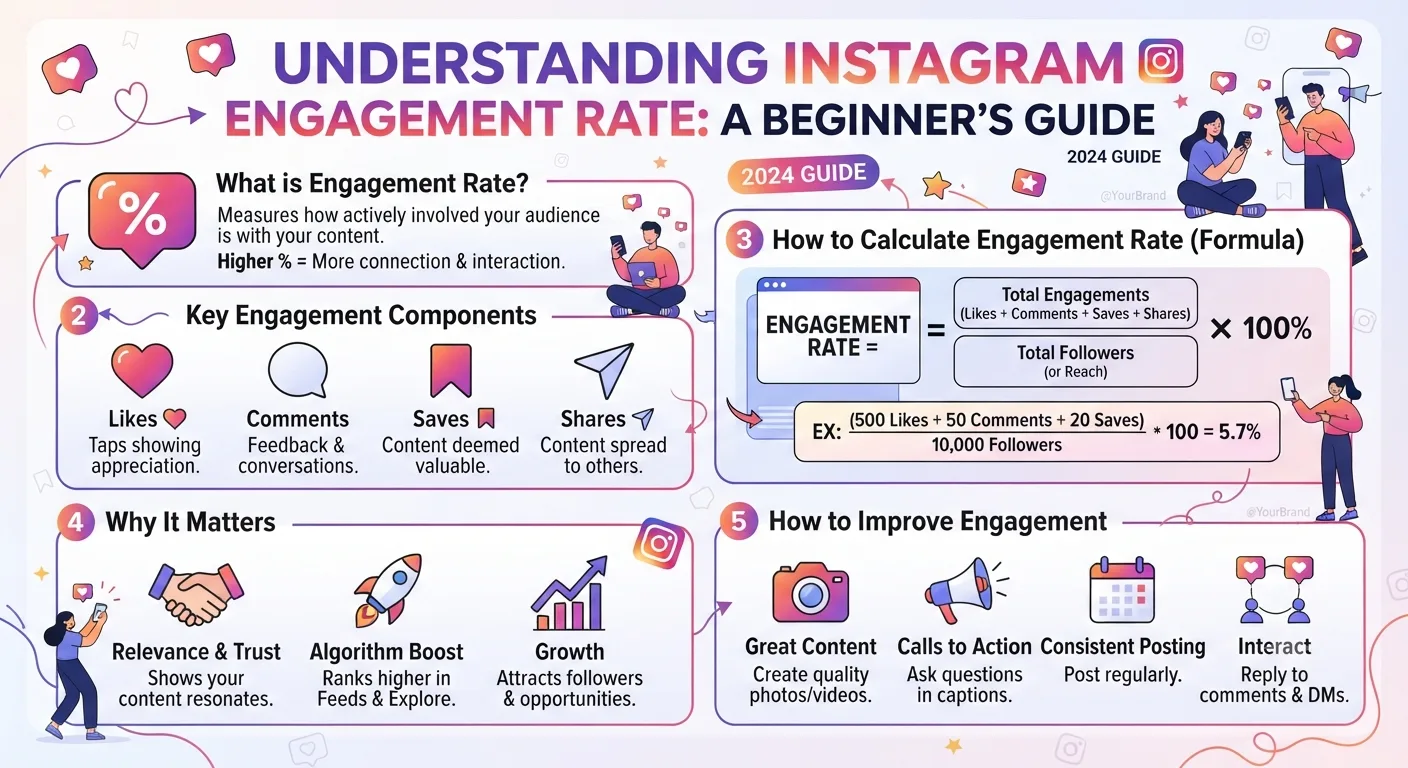
At its most fundamental level, engagement rate measures the percentage of an account's audience that actively interacts with its content.
Think of it this way. Imagine an account has 10,000 followers. If a post gets 50 likes and 10 comments, only 60 people out of 10,000 actually did anything in response to that content. That is 0.6 percent of the audience a low engagement rate that suggests most followers are passive or uninterested.
Now imagine a different account with the same 10,000 followers, but their posts consistently get 500 likes, 80 comments, and 120 saves. That is 700 interactions from 10,000 followers a 7 percent engagement rate that signals a genuinely active, interested audience.
Both accounts have the same follower count. But the second account has an audience that is more than ten times more engaged. For a brand considering a sponsorship, for a creator benchmarking their growth, or for a social media manager evaluating a strategy that difference is enormous.
Engagement rate is the metric that reveals whether followers are real, interested people or empty numbers sitting on a profile doing nothing.
Why Engagement Rate Matters More Than Follower Count
This is the insight that separates experienced Instagram marketers from beginners: follower count is a vanity metric. Engagement rate is a performance metric.
Follower count tells you how many people have pressed a follow button at some point in time. It does not tell you whether those people are still interested in the account, whether they see the content in their feeds, whether they trust the account enough to act on its recommendations, or whether they are even real human beings rather than bots.
Engagement rate cuts through all of that noise. It measures actual human behavior people choosing to like, comment, save, or share content. These are deliberate actions that require genuine interest and attention. They cannot be faked at scale the way follower counts can be purchased.
-
How to Download Instagram Stories for Free Using InstaPV
-
What Are Instagram Highlights? How to View Them Anonymously
-
5 Best Free Instagram Story Viewer Tools Compared (2026)
For brands and marketers, this distinction is directly tied to money. A sponsored post on an account with 500,000 followers and 0.3 percent engagement will reach far fewer genuinely interested people than a sponsored post on an account with 50,000 followers and 6 percent engagement. The smaller account will almost always deliver better campaign results more clicks, more conversions, more genuine brand awareness despite having one-tenth the followers.
For creators and account owners, engagement rate is the clearest signal of whether your content strategy is working. You can grow your follower count through various tactics giveaways, follow-for-follow strategies, paid promotions without that growth reflecting genuine audience interest. Engagement rate cannot be gamed in the same way. If your engagement rate is high, your audience genuinely cares about your content. If it is low, something needs to change.
What Counts as Engagement?
Before calculating engagement rate, you need to know what interactions are counted as engagement. The answer varies slightly depending on which formula you use, but the standard components are:
Likes
The most basic form of engagement a quick tap to signal approval or appreciation. Likes are easy to give and require minimal commitment from the viewer. They are included in virtually every engagement rate calculation but carry less weight individually than deeper engagement signals.
Comments
Comments represent significantly more effort and interest than likes. Leaving a comment requires the viewer to formulate a thought and type it out a deliberate act that signals genuine engagement with the content. Comments are weighted more heavily by Instagram's algorithm and are a stronger indicator of content quality than likes alone.
Saves
Saves have become one of the most important engagement signals on Instagram in recent years. When someone saves a post, they are telling Instagram and you that the content was valuable enough to keep for future reference. Save rates are particularly high for educational content, tutorials, recipes, travel inspiration, and anything else people want to return to. Instagram's algorithm treats saves as a strong positive signal for content distribution.
Shares
Shares when someone sends your post to another user via direct message or reposts it to their own story are the deepest engagement signal of all. Sharing requires the viewer to actively decide that someone else in their network would benefit from or enjoy the content. High share rates indicate content with genuine word-of-mouth potential.
Story-Specific Engagement
For stories specifically, engagement includes replies (direct messages sent in response to a story), story shares (when someone reposts your story to their own), poll responses, question answers, quiz taps, slider reactions, and link taps. These story-specific interactions follow the same principle they represent active, deliberate audience behavior rather than passive consumption.
How to Calculate Instagram Engagement Rate
There are several different formulas for calculating engagement rate, each with slightly different applications. Here are the three most commonly used.
Formula 1: Engagement Rate by Followers (Most Common)
This is the standard engagement rate formula used by most marketers and analytics tools:
Engagement Rate = (Total Engagements ÷ Total Followers) × 100
Where total engagements on a post typically means likes plus comments plus saves plus shares.
Example:
- A post receives 340 likes, 45 comments, 80 saves, and 35 shares
- Total engagements = 340 + 45 + 80 + 35 = 500
- The account has 12,500 followers
- Engagement Rate = (500 ÷ 12,500) × 100 = 4.0%
This formula is best for benchmarking your own account's performance over time and comparing it against industry standards.
Formula 2: Engagement Rate by Reach
This formula uses reach the number of unique accounts that actually saw the post instead of total followers:
Engagement Rate by Reach = (Total Engagements ÷ Post Reach) × 100
This formula is more accurate for measuring how compelling a specific piece of content was to the people who actually saw it, since not all followers see every post. However, reach data is only available to the account owner through Instagram Insights it is not a publicly visible metric.
For researching other accounts, Formula 1 is the only viable option since reach data is not publicly accessible.
Formula 3: Average Engagement Rate
Rather than calculating engagement rate for a single post, average engagement rate looks at performance across multiple posts to get a more representative picture of an account's typical performance:
Average Engagement Rate = (Sum of Engagement Rates for All Posts in Period) ÷ Number of Posts
Or more practically:
Average Engagement Rate = (Total Engagements Across All Posts ÷ (Total Followers × Number of Posts)) × 100
Using an average across 10 to 20 recent posts gives a much more reliable picture of an account's true engagement level than any single post, which could be unusually high or low due to factors unrelated to overall account health.
Instagram Engagement Rate Benchmarks for 2025
One of the most common questions about engagement rate is: what is actually a good number? The honest answer is that it depends heavily on account size larger accounts consistently show lower engagement rates than smaller ones, for structural reasons that have nothing to do with content quality.
Here are current engagement rate benchmarks for Instagram in 2025, broken down by account size:
| Account Size | Low (Needs Improvement) | Average | Good | Excellent |
|---|---|---|---|---|
| Nano (under 5K) | Below 3% | 3% – 5% | 5% – 8% | Above 8% |
| Micro (5K – 50K) | Below 2% | 2% – 4% | 4% – 6% | Above 6% |
| Mid-tier (50K – 500K) | Below 1% | 1% – 2.5% | 2.5% – 4% | Above 4% |
| Macro (500K – 1M) | Below 0.8% | 0.8% – 1.5% | 1.5% – 2.5% | Above 2.5% |
| Mega (Above 1M) | Below 0.5% | 0.5% – 1% | 1% – 2% | Above 2% |
Why Do Larger Accounts Have Lower Engagement Rates?
This is a question beginners often ask if an account has more followers, surely more people are engaging? The answer lies in how audiences scale versus how engagement scales.
When an account is small, its followers tend to be highly self-selected people who genuinely sought out and chose to follow the account because they are deeply interested in the content. As an account grows larger, a greater proportion of followers are people who followed casually, followed because of a single viral post, or followed years ago when their interests were different.
Instagram's algorithm also plays a role. The platform does not show every post to every follower it distributes content based on predicted interest. As follower counts grow, the algorithm becomes more selective, meaning a smaller percentage of followers see any given post.
The result is that large accounts almost always have lower engagement rates than small ones not because their content is worse, but because large audiences are inherently less uniformly engaged than small ones.
How to Check Engagement Rate for Any Public Instagram Account
If you want to check the engagement rate of an account you do not own a competitor, a potential influencer partner, or simply an account you are researching there are two approaches.
Manual Calculation
You can calculate it manually using Formula 1. Visit the public profile, note the follower count, then look at their last 10 to 15 posts and calculate the average likes plus comments per post. Divide that average by the follower count and multiply by 100.
This gives you a reasonable estimate, but it requires manual effort and does not account for saves and shares, which are not publicly visible on Instagram's interface.
Use InstaPV's Analytics Engine
InstaPV calculates engagement rate automatically for any public Instagram account and displays it in the analytics dashboard alongside follower growth trends and posting frequency data. This saves significant time compared to manual calculation and provides a more complete picture since InstaPV's analytics engine accounts for multiple engagement signals rather than just the publicly visible likes and comments.
For anyone doing regular influencer research or competitive benchmarking, InstaPV's analytics approach is far more efficient than manual calculation search a username, open the analytics view, and have the engagement rate in seconds.
What Causes Engagement Rate to Drop?
Understanding why engagement rate drops is just as important as knowing how to measure it. Here are the most common causes:
Inconsistent Posting
Instagram's algorithm rewards consistency. Accounts that post regularly maintain stronger positions in their followers' feeds than accounts that post sporadically. If you post every day for a month and then go quiet for three weeks, expect your engagement rate to drop significantly when you resume the algorithm has deprioritized your content in followers' feeds.
Content That Does Not Match Audience Expectations
Every account builds an implicit contract with its audience followers choose to follow because they expect a certain type of content. When that content changes significantly a food blogger suddenly posting about finance, a fitness creator shifting to political commentary many existing followers disengage. If new content does not resonate with the audience that originally chose to follow, engagement drops.
Buying Followers
Purchased followers are almost universally bots or inactive accounts. They inflate follower count without contributing any engagement. An account with 30,000 real followers and 10,000 purchased followers will show an engagement rate that appears lower than it actually is relative to its genuine audience and will perform worse on the benchmarks above despite the inflated numbers.
Declining Content Quality or Relevance
Sometimes the answer is simple: the content is not as good as it used to be, or it is no longer as relevant to what the audience cares about. This is a natural occurrence as accounts evolve, but it requires honest self-assessment and content strategy adjustment to address.
Algorithm Changes
Instagram periodically updates its distribution algorithm in ways that affect how widely content is shown. An engagement rate drop that happens suddenly across many different accounts simultaneously may reflect an algorithm update rather than anything specific to your content strategy.
How to Improve Your Instagram Engagement Rate
Here are the most effective strategies for improving engagement rate, based on what consistently works across different account sizes and niches.
Create Content Worth Saving
Because saves carry significant algorithmic weight, creating content that people want to keep for future reference is one of the highest-leverage things you can do for engagement rate. Educational posts, step-by-step tutorials, resource lists, tip collections, and before-and-after transformations all generate high save rates.
Ask yourself before publishing any piece of content: would someone save this? If the honest answer is no, consider whether it is worth posting.
Write Captions That Invite Response
The caption is your primary tool for generating comments. Open-ended questions, polls presented in caption form, requests for opinions, and prompts that invite personal stories all drive comment activity. The more specific and relevant the question, the higher the response rate "What is your biggest challenge with X?" will generate more comments than "What do you think?"
Post When Your Audience Is Active
Timing matters for engagement rate because posts published when your audience is most active will accumulate more engagement in the first hour which signals the algorithm to distribute the content more broadly. For most accounts, early morning and early evening on weekdays show the strongest initial engagement. Use Instagram Insights or InstaPV's analytics data to identify your specific audience's peak activity times.
Respond to Every Comment
Responding to comments does two things. First, it signals to the algorithm that your post is generating active conversation each reply is additional engagement on the post. Second, it builds the kind of genuine audience relationship that turns casual followers into loyal, regularly engaging community members. The accounts with the highest engagement rates almost universally have creators who actively participate in comment conversations.
Use Stories to Drive Feed Engagement
Stories and feed posts work together. Using stories to tease a new feed post showing behind-the-scenes context, asking for opinions before sharing your perspective, or directing story viewers to your latest post drives initial engagement spikes that boost algorithmic distribution.
Collaborate With Accounts in Your Niche
Collaborations expose your content to audiences that are already interested in your topic area. When a similar account mentions you, reposts your content, or collaborates on a joint post, their followers who are pre-qualified to be interested in your niche often follow and engage with your account. This brings in new followers who are likely to have above-average engagement rates with your content.
Frequently Asked Questions
Q: Is engagement rate the same as reach rate? No. Engagement rate measures interactions as a percentage of followers. Reach rate measures what percentage of your followers actually saw a given post. Both are useful metrics but they measure different things. Reach rate requires access to Instagram Insights and is not publicly visible, while engagement rate can be calculated from publicly available data.
Q: Can I have a high engagement rate with a small following? Absolutely and this is actually common. Nano and micro accounts frequently show the highest engagement rates on the platform because their audiences are highly self-selected and the creator can maintain personal relationships with individual followers. Many brands specifically seek out small accounts with high engagement rates for influencer partnerships because they deliver better results per follower than large accounts with diluted engagement.
Q: Should I be worried if my engagement rate fluctuates week to week? Some week-to-week fluctuation is completely normal and should not cause concern. Individual posts naturally perform differently depending on content type, timing, and topical relevance. What matters is the trend over a longer period a month or more. If your average engagement rate over 30 days is declining consistently, that is worth investigating. Fluctuations within a week are noise, not signal.
Q: How does engagement rate affect Instagram's algorithm? Instagram's algorithm uses engagement signals particularly comments, saves, and shares as strong indicators that content is worth distributing to wider audiences. A post that generates high engagement in the first hour after publishing will be shown to more followers and potentially featured on the Explore page. Consistently high engagement rate across your posts trains the algorithm to give your content broader distribution by default.
Q: Is there a tool that tracks engagement rate automatically for accounts I do not own? Yes. InstaPV's analytics engine calculates and tracks engagement rate for any public Instagram account. This is particularly useful for competitive benchmarking and influencer research, where manually calculating engagement rates across multiple accounts would be time-consuming. Visit instapv.xyz to search any public account and view its analytics data.
Conclusion
Instagram engagement rate is not a complicated concept once you understand what it is measuring and why it matters. It is simply a way of answering one fundamental question: of all the people who follow this account, what percentage are actually paying attention?
A high engagement rate means an audience that is genuinely interested, actively responsive, and likely to act on what the account posts. A low engagement rate regardless of how impressive the follower count looks means an audience that is largely passive, disengaged, or not real.
For creators, understanding engagement rate is the foundation of building an Instagram strategy that actually works. For brands and marketers, it is the essential filter for separating genuinely effective influencer partnerships from superficially impressive vanity metrics. For researchers using tools like InstaPV, it is the single most important number to look at when evaluating any public Instagram account.
Start paying attention to engagement rate for your own account, for your competitors, and for any influencer you are considering working with and you will make significantly better decisions at every stage of your Instagram strategy.
Check engagement rate for any public Instagram account on InstaPV →