Introduction
For several years, the swipe-up link was one of Instagram's most coveted features. The ability to add a clickable link directly to a Story, allowing viewers to swipe upward to visit an external website without leaving the app, was restricted to accounts with 10,000 or more followers and verified accounts. This restriction made the swipe-up link a milestone that creators and brands worked toward as a meaningful threshold for Instagram marketing capability.
In 2021, Instagram replaced the swipe-up mechanic with a link sticker, and in 2023 it removed the follower count requirement entirely, making Story links available to all accounts regardless of size. This was a significant change that many people are still unaware of, particularly those who formed their understanding of Instagram features during the period when the 10,000 follower threshold was in place.
This guide covers how Story links currently work in 2026, who can use them, how to add them, and how to use them effectively to drive meaningful traffic and conversion from Instagram Stories.Instapv
The End of the Swipe-Up: What Changed
The original swipe-up feature worked exactly as described: viewers would see a "Swipe Up" prompt at the bottom of a Story and could swipe upward to open an external link in Instagram's built-in browser. The action required a deliberate, continuous swiping motion to activate.
Instagram replaced this with a link sticker in October 2021. Rather than a swipe-up prompt anchored to the bottom of the screen, the link sticker is a customizable sticker element that can be placed anywhere on the Story frame. Viewers tap the sticker to open the link rather than swiping up.
The functional change from swipe to tap was relatively minor from the viewer's perspective. The more significant change came when Instagram removed the 10,000 follower requirement in October 2023, opening link stickers to all accounts regardless of size.Read blog
This democratization of Story links was a meaningful shift for small accounts and creators in the early stages of building their audience, who previously had no way to drive direct link traffic from Stories.
Who Can Use Story Links in 2026
As of 2026, the link sticker in Instagram Stories is available to all Instagram accounts without any follower count requirement, verification requirement, or account type restriction.
Both personal and business accounts can add link stickers to their Stories. Both small accounts with a few hundred followers and large accounts with millions of followers have the same access to the link sticker feature.
The only requirement is that the account is in good standing with Instagram's community guidelines. Accounts that have been restricted or penalized for guideline violations may have access to certain features limited as part of those restrictions.
How to Add a Link Sticker to a Story
The process of adding a link sticker is straightforward and consistent across devices.
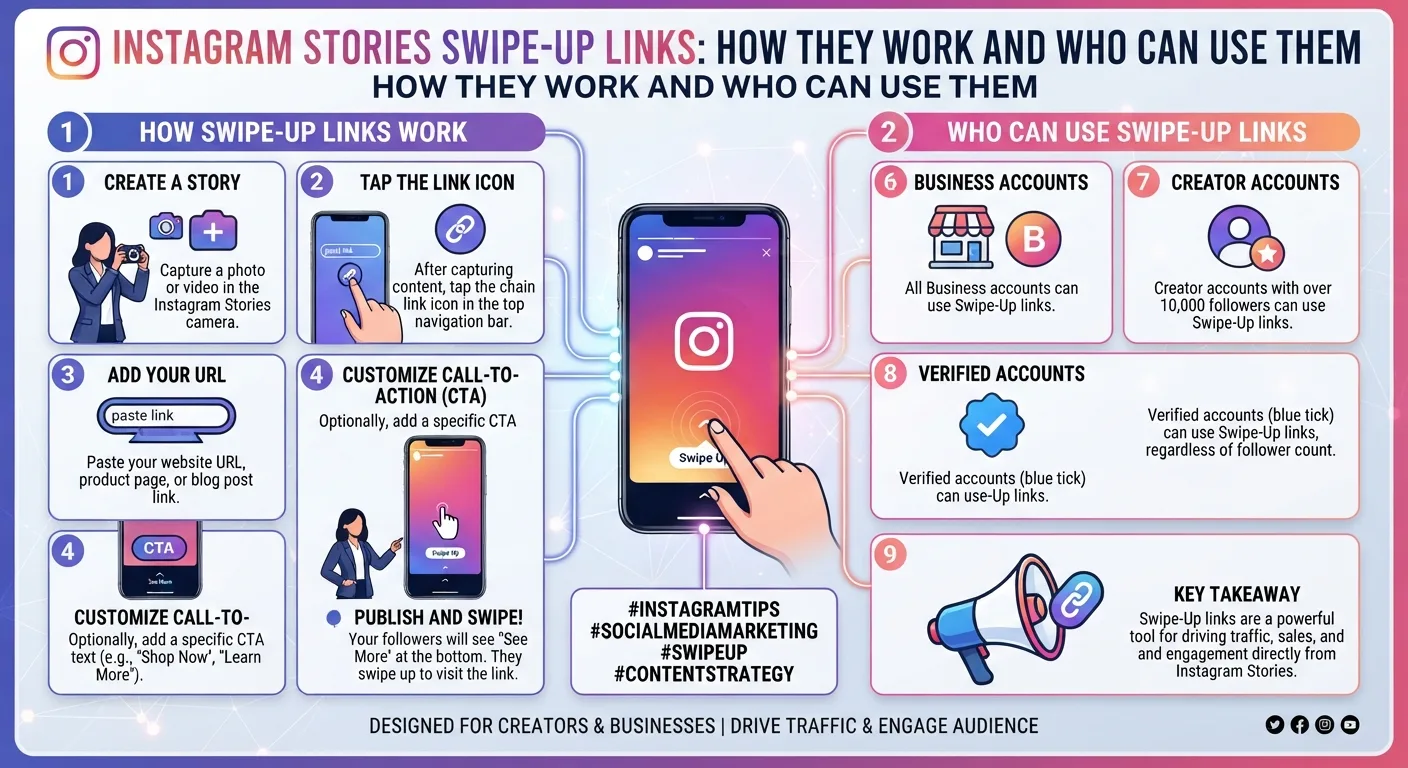
Create your Story content as usual, whether a photo, video, boomerang, or text-based Story. Before publishing, tap the sticker icon in the top right of the Story creation screen. This opens the sticker tray. Scroll through the sticker options or use the search function to find the Link sticker. Tap the Link sticker to select it.
A text field appears where you enter the URL you want to link to. Type or paste the full URL including the https prefix. Optionally customize the text that appears on the sticker itself. Instagram defaults to showing the URL domain name on the sticker, but you can replace this with custom text that better describes the destination, such as Shop Now, Read More, or Sign Up.
Once the URL is entered and sticker text is customized, tap Done to place the sticker on your Story frame. You can drag it to any position on the frame, resize it by pinching, and rotate it by twisting with two fingers.
Publish the Story as usual. Viewers can now tap the link sticker to open the linked URL in Instagram's built-in browser.
How Link Stickers Appear to Viewers
From the viewer's perspective, a link sticker appears as a small button or pill-shaped element on the Story frame with text describing the destination. The sticker is visually distinct from other Story elements and is clearly interactive rather than purely decorative.
When a viewer taps the link sticker, the linked URL opens in Instagram's built-in browser, which overlays the current app experience without requiring the viewer to leave Instagram entirely. From the built-in browser, the viewer can also open the link in their default external browser if they prefer.
The tap action is significantly more intuitive than the original swipe-up mechanic for many viewers, particularly those who discovered Instagram after the swipe-up feature was replaced. The sticker's visual presence makes the interactive element obvious in a way that the bottom-anchored swipe-up prompt was not always for less experienced users.
Customizing the Link Sticker
The ability to customize the text displayed on the link sticker is one of its most practically useful features. Several customization approaches improve conversion rates relative to simply showing the raw URL.
Using action-oriented text that describes what happens when the viewer taps, such as Shop the Look, Get the Recipe, Download Free Guide, or Watch the Full Video, consistently outperforms generic text like Link or Visit. The specific description of the destination creates clearer expectations and stronger motivation to tap.
Matching the sticker text to the specific call to action in the Story's verbal or visual content creates reinforcement between what the Story is communicating and what the sticker invites the viewer to do. A cooking demonstration Story that verbally says "full recipe in the link" should have a sticker that says Get the Recipe rather than just showing a URL.
Considering the visual integration of the sticker into the Story design matters for conversion. A sticker placed in an area of the frame with high visual contrast against the background is easier to notice and tap than one that blends into a visually busy section of the frame.
What Links Work in Story Stickers
Link stickers support any publicly accessible URL. Common link destinations for Story link stickers include:
Product pages for specific items featured in the Story. Blog posts or articles that expand on content introduced in the Story. Landing pages for specific campaigns, lead generation forms, or event registrations. YouTube videos or podcast episodes referenced in the Story. Newsletter sign-up pages. App store listings for mobile applications. Booking or appointment scheduling pages.
The most effective link destinations are specific rather than generic. Sending Story viewers to a specific product page directly relevant to the Story content consistently converts better than sending them to a general website homepage where they must navigate to find what the Story referenced.
Tracking Link Sticker Performance
Instagram provides analytics for link sticker taps through the Story analytics view in Instagram Insights, available for business and creator accounts.
For each Story that includes a link sticker, Insights shows the number of taps the sticker received. This tap count is the primary metric for assessing link sticker performance.
Beyond the raw tap count, the meaningful metrics are tap rate, the percentage of Story viewers who tapped the link, and the downstream behavior of visitors who arrived at the destination URL.
Tap rate is calculated by dividing link taps by total Story views. A typical tap rate varies significantly based on how relevant and compelling the link destination is to the Story's content and audience, but a rate above 5 percent for a commercially oriented Story to a relevant audience is generally considered solid.
Tracking what those visitors do after arriving at the destination requires website analytics configured to identify Instagram Story traffic. Using UTM parameters on Story link URLs allows separating Story-sourced traffic from other Instagram traffic in Google Analytics or your preferred analytics platform. Adding a utm_source value of instagram and a utm_medium value of story identifies this traffic precisely in downstream reporting.
Using Link Stickers Strategically
Having universal access to Story link stickers does not mean every Story should include one. Strategic use of link stickers produces better results than adding them reflexively to every Story.
Matching Links to Story Content
The most effective Story links are directly and specifically relevant to the content of the Story they appear in. A Story showing a product in use should link directly to that product's page. A Story discussing a specific piece of advice should link to a longer resource exploring that advice in depth. The link should feel like a natural extension of the Story content rather than a generic call to action tacked onto unrelated content.
Creating Narrative Flow Toward the Link
Rather than simply placing a link sticker on a single Story frame, building a short sequence of Story frames that develops context and desire before presenting the link sticker creates higher tap rates than presenting the link without narrative setup.
A two or three frame sequence that establishes a problem, hints at a solution, and then presents the link as access to that solution creates genuine viewer motivation to tap rather than relying on the sticker's presence alone to generate clicks.
Timing Within a Story Sequence
For multi-frame Story sequences, placing the link sticker on a frame after the most compelling content in the sequence, rather than on the first or second frame, captures viewers who are most engaged after having watched through the narrative rather than those who have not yet seen the value being presented.
Frequency and Audience Expectations
Regular Story links in specific and predictable contexts, such as consistently linking to new blog posts in educational Stories or consistently linking to product pages in product Stories, trains the audience to expect and look for link stickers in those specific contexts. This trained expectation improves tap rates over time as followers understand the pattern of when links appear and what they lead to.
Link Stickers for Different Account Types
The strategic use of link stickers differs across account types based on what outcomes the links are designed to drive.
For e-commerce brands, as covered in Day 14's e-commerce guide, link stickers provide the most direct path from product Stories to purchase, and using them consistently on product and promotion Stories is a straightforward best practice.
For content creators and media accounts, link stickers drive traffic to longer form content, newsletter sign-ups, and YouTube channels, effectively using Instagram Stories as a distribution channel for other content formats.
For service businesses, link stickers drive inquiries, booking requests, and consultation sign-ups, converting Story viewers directly into business leads.
For non-profits, as covered in Day 18's non-profit guide, link stickers can drive donations and volunteer applications directly from Stories, providing a conversion path that complements the organization's broader awareness-building content.
Frequently Asked Questions
Q: Is there still a follower count requirement for Story links in 2026?
No. The 10,000 follower requirement that previously applied to the swipe-up link feature was removed when Instagram transitioned to link stickers. All accounts can add link stickers to their Stories regardless of follower count as of 2026.
Q: Can I add multiple link stickers to a single Story frame?
Instagram allows only one link sticker per Story frame. If you need to reference multiple destinations, you can either use separate Story frames for each link or direct viewers to a link in bio page that consolidates multiple links.
Q: Do link stickers work in Stories saved to Highlights?
Yes. Link stickers remain active in Stories saved to Highlights. Viewers who discover Highlight content can tap link stickers within Highlights to visit the linked destinations, though the links should ideally go to evergreen destinations rather than time-sensitive promotions that will no longer be relevant when discovered through Highlights.
Q: Can viewers see how many other people have tapped the link sticker?
No. Link sticker tap counts are private analytics visible only to the account owner through Instagram Insights. Viewers cannot see how many others have tapped a specific link sticker.
Q: Does using a link sticker affect Story reach or algorithmic placement?
Instagram has not publicly specified whether link sticker usage directly affects Story algorithmic placement. The engagement signal most directly relevant to Stories algorithmic placement is completion rate and interactive element responses as covered in Day 7's algorithm guide, rather than link tap behavior specifically.
-
How to Research Top Instagram Accounts in Any Niche
-
How to Do Instagram Market Research for Free
-
Best Instagram Analytics KPIs to Track Monthly
Conclusion
Instagram's Story link sticker in 2026 is a universally available feature with no follower count restrictions that provides every account the ability to drive direct link traffic from Stories. The transition from swipe-up to tap sticker made the mechanic more intuitive, and the removal of the follower threshold democratized a previously exclusive capability.
Using link stickers effectively means customizing sticker text to describe the specific destination, building narrative context that motivates the tap, placing links after engaging content within a sequence, and tracking performance through UTM parameters that connect Story traffic to downstream website behavior.
For accounts at any size that create Instagram Stories, the link sticker is a consistently underused conversion tool that represents genuine traffic and business impact potential for those who use it with clear purpose and appropriate strategic intent.
Research how top accounts in your niche use Story links and interactive features on InstaPV →