Introduction
Content consistency is one of the most reliable drivers of Instagram growth, as established throughout this series. But consistency is genuinely difficult to maintain without a system. Deciding what to post on the day of posting, under time pressure, almost always produces lower quality content than content planned in advance with clarity about purpose, format, and audience.
A content calendar solves this problem. It moves the creative and strategic decisions out of the moment of execution and into a dedicated planning session, leaving the posting day free for production and engagement rather than strategic decision making under pressure.
This guide covers how to build a 30 day Instagram content calendar from scratch, including a practical template structure, a planning process, and the specific decisions that need to be made for each post before the month begins.
Why a 30 Day Calendar Works Better Than Shorter Planning Horizons
Planning a week ahead is better than planning day by day. Planning a month ahead is better still, for several specific reasons.
A 30 day view makes content pillar balance visible in a way that a one week view does not. If you plan only a week at a time, it is easy to unconsciously drift toward your most comfortable content type and away from others without noticing. A month view makes this imbalance immediately visible.Instapv
Monthly planning aligns naturally with campaign and promotional cycles. Most businesses and brands operate on monthly cycles for promotions, launches, and initiatives. Building a content calendar around these cycles ensures Instagram content supports broader business objectives rather than operating independently.
Batch production becomes possible at the monthly planning stage. Once a full month of content is mapped out, you can identify which posts can be produced together efficiently, grouping similar production requirements rather than switching between different production modes for every individual post.
The Template Structure
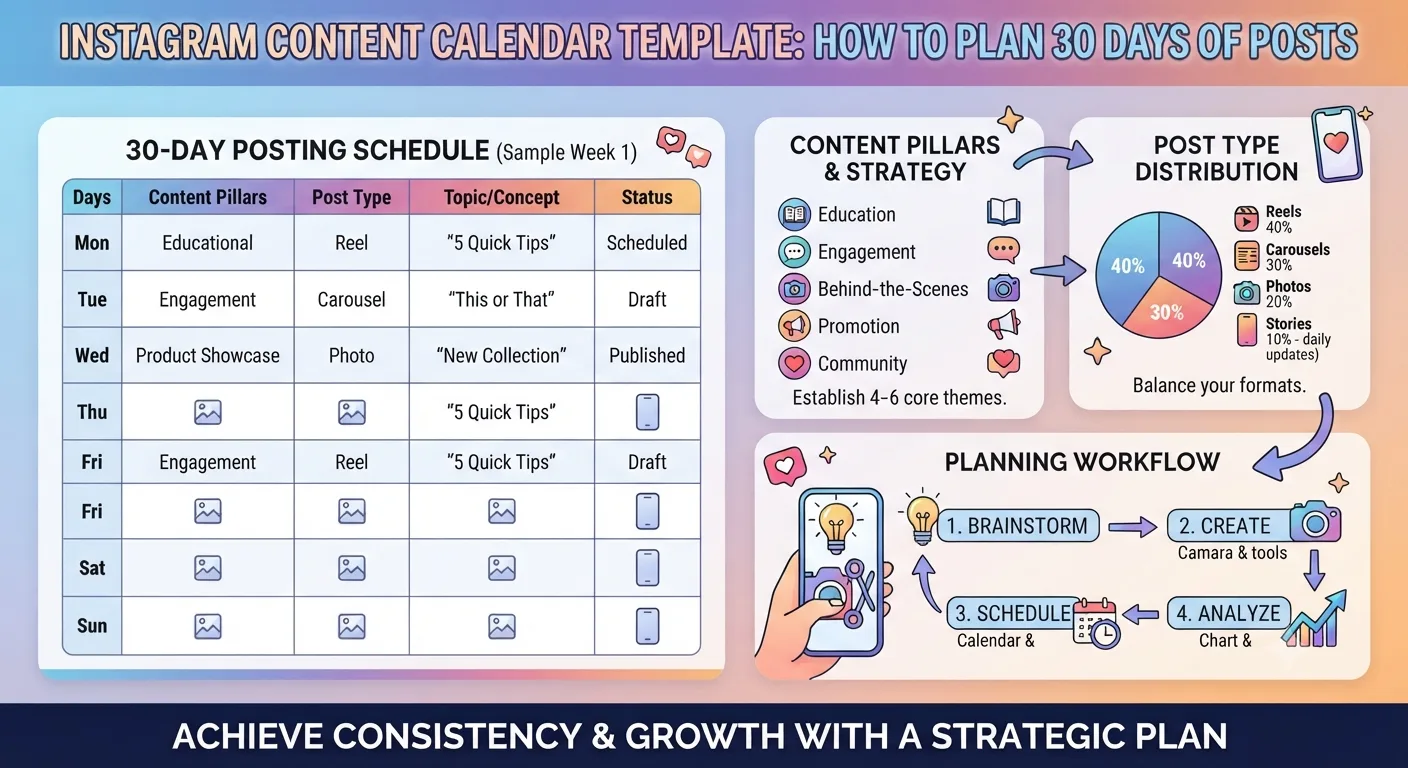
Here is the core structure for a 30 day Instagram content calendar. Each row represents one planned piece of content.
Column 1: Date and Day
The specific date and day of the week. This column makes it immediately visible whether your planned posting schedule is consistent and whether you are spacing content appropriately across the week.
Column 2: Content Pillar
Which of your defined content pillars this post belongs to. As covered in Day 10's small business guide and Day 11's personal brand guide, content pillars are the two to four core themes that define your account. Tracking pillar by pillar across the calendar makes it easy to see whether each pillar is receiving appropriate allocation.
Column 3: Format
Whether this post is a Reel, carousel, single image, Story, or other format. As covered in Day 12's format comparison guide, different formats serve different purposes and the format mix should reflect strategic intent. Seeing the full month's format distribution in one view makes it easy to ensure Reels are receiving enough allocation for growth, carousels for engagement and saves, and Stories for daily connection.
Column 4: Topic or Title
A specific working title or topic description for the post. This should be specific enough to know exactly what the post is about without requiring further creative decisions during production. "Tips for building a morning routine" is too vague. "5 morning routine habits that take under 10 minutes each" is specific enough to produce directly.
Column 5: Caption Hook
A draft of the opening line of the caption. As covered in Day 12's caption guide, the first line is the most important sentence in any caption. Drafting it during planning rather than during production keeps the creative and strategic work separated from the execution work.
Column 6: Call to Action or Question
The specific engagement prompt or call to action for this post. Again, deciding this during planning rather than at the moment of posting produces more deliberate, effective calls to action than last minute additions.
Column 7: Production Status
A simple status tracker showing whether each post is planned, in production, ready, or published. This column transforms the calendar from a planning document into a production management tool.
The Planning Process: How to Fill the Calendar
Step 1: Mark Fixed Dates First
Before planning any content, mark the fixed dates in the month that require specific content. These include product launches, promotions, events, seasonal moments relevant to your niche, and any external events or cultural moments relevant to your audience.
These fixed dates anchor the calendar. Content in the days leading up to each fixed date can be used to build anticipation, and content in the days following can be used to extend the moment or gather feedback.
Step 2: Allocate Posts Across Your Pillars
Decide how many posts each pillar should receive across the month and mark these allocations across the calendar. If you post 20 times in a month and have four content pillars, a simple equal allocation gives each pillar five posts. If your analytics, as covered in Day 10's content planning guide, show that certain pillars consistently outperform others, weight the allocation toward higher performing pillars while maintaining some presence across all of them.
Step 3: Assign Formats to Each Planned Post
Working through each allocated post, assign a format based on the content type and the strategic purpose. Educational and reference content gets carousel format for the save rate advantage covered in Day 11's Reels guide. Growth focused content gets Reel format. Permanent brand content gets single image or carousel. Daily connection content goes to Stories.
Check the full month's format distribution and adjust until it reflects the intended balance between growth formats, engagement formats, and relationship formats.
Step 4: Develop Specific Topics for Each Post
Working post by post through the calendar, develop specific topics for each slot. Use the analytics driven topic selection process from Day 10's content planning guide, combining your own top performing topics with competitive research from InstaPV on what is currently working in your niche.
The goal is a specific working title for each post that is developed enough to move directly to production without additional topic decisions during the production phase.
Step 5: Draft Hooks and Calls to Action
For each planned post, draft a working caption hook and a specific closing question or call to action. These will be refined during production but having a working draft means the strategic thinking is already done before you sit down to create.
Building Thematic Weeks Into the Calendar
One planning approach that many accounts find effective is organizing the calendar around weekly themes rather than distributing content across pillars randomly throughout the month.
A weekly theme approach dedicates each week to a specific topic area within your broader pillars. Week one might focus on beginner content for new followers. Week two might focus on a specific advanced topic for established followers. Week three might be organized around a specific product, service, or campaign. Week four might be a mix of community content and forward looking teases for the following month.
Thematic weeks create a sense of narrative progression across the month that random content distribution does not produce. Regular followers experience the account as covering topics with depth and intention rather than posting randomly across a broad range of subjects.
Balancing Planned Content with Reactive Opportunities
A fully planned calendar should still leave room for reactive content that responds to current events, trending topics, or unexpected opportunities relevant to your niche.
Leaving two to four unscheduled slots in a 30 day calendar provides flexibility for reactive content without disrupting the overall planned structure. These unscheduled slots can be filled by moving a lower priority planned post to the following month if a more timely reactive opportunity arises.
The Review and Adaptation Cycle
At the end of each month, review actual performance against the calendar to inform next month's planning. As covered in Day 10's content planning guide, identifying which topics, formats, and posting times produced the strongest results feeds directly into the next month's planning decisions.
This review should be built into the planning process as a standard first step rather than an occasional retrospective. Spend 30 to 60 minutes at the end of each month reviewing what worked before beginning the following month's calendar.
Tools for Building and Managing the Calendar
The calendar structure above works in any tool that supports tabular data. A spreadsheet is the simplest option and is sufficient for most individual accounts and small teams. Shared spreadsheets work well for small teams where multiple people need access.
For larger teams or agencies managing multiple client calendars simultaneously, dedicated social media management platforms offer more sophisticated calendar management with approval workflows, scheduling integration, and multi-account views. Several of these platforms were covered in Day 7's analytics tools comparison.
The tool matters less than the consistency of the process. A simple spreadsheet calendar used consistently every month produces far better results than a sophisticated platform used irregularly.
-
How Journalists Use Instagram Viewer Tools for Research
-
What Happens When You View Someone Instagram Story?
-
Top Instagram Tools Every Creator Needs in 2026
Frequently Asked Questions
Q: How far in advance should individual posts be produced relative to their planned publication date?
Aiming to have each post fully produced and ready at least three to five days before its planned publication date creates a comfortable buffer that prevents last minute production pressure and allows time for review and quality checks before publishing.
Q: What should I do if a planned post becomes irrelevant due to external events?
Flexibility is built into the calendar precisely for this situation. Replace the irrelevant planned post with either a reactive post addressing the external development or a previously planned post from the following month's reserve. The goal is maintaining the publishing schedule rather than publishing content that no longer makes sense in context.
Q: Should Stories be planned on the same calendar as feed posts?
Including Stories in the calendar is valuable for accounts treating Stories strategically, as covered in Day 8's Stories best practices guide. Story planning does not need to be as specific as feed post planning since Stories are inherently more spontaneous, but noting which days should include Stories and what general type of Story content is planned maintains the consistency that matters for Stories bar placement.
Q: How do I research what topics to plan for next month?
Combining your own analytics data on what topics performed best this month with competitive research through InstaPV on what is currently working for successful accounts in your niche, as covered in Day 10's content planning guide, gives you the most grounded basis for next month's topic planning.
Conclusion
A 30 day content calendar is not a bureaucratic constraint on creativity. It is the infrastructure that makes consistent, strategic content creation sustainable over time. The planning investment of two to three hours at the start of each month pays for itself many times over in reduced daily decision fatigue, higher content quality, and the strategic coherence that comes from seeing the full month's content as a unified body of work rather than a series of individual posts.
Build the calendar once, refine the process each month based on what you learn, and the system becomes progressively more efficient and more effective over time.
Research top performing content in your niche to inform your calendar planning on InstaPV →